Policy & enforcement
The governance object that sets your posture, the auto-approve rules that cut routine friction, Trust Mode, and the allow/ask/deny enforcement kernel that applies everywhere.
This is the operator's control room for what runs automatically, what asks first, and what's forbidden. It lives in one place: the Security tab of Oversight, read top to bottom, your posture, what your agents can do, guardrails (the never / ask-first rules), approvals (what runs without asking), and team permissions. Every control has an i with a plain-English explanation and an example, and every change saves automatically.
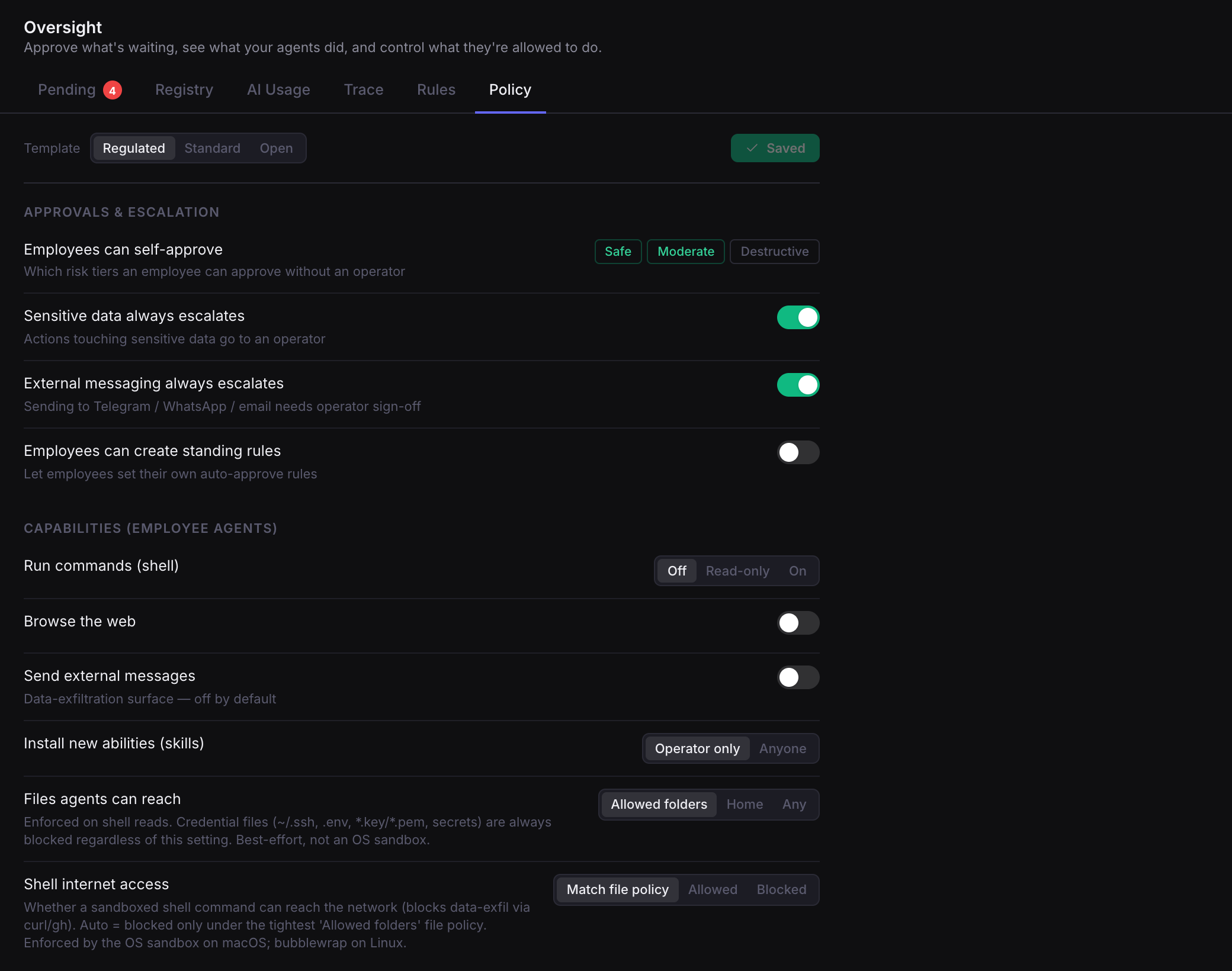
Posture: your starting point#
Each workspace has one policy object covering approval tiers, capabilities, visibility, limits, and agent lifecycle. Pick a posture to set sensible defaults in one choice: Regulated (maximum oversight), Standard (recommended for most teams), or Open (light oversight). Tune anything afterward; once you do, the posture reads Custom and a preset is one click away to reset. You can also set posture during onboarding.
Ceiling: Capability enforcement is seeded-gated: it stays off until an operator explicitly saves a policy, so a fresh install never breaks itself by enforcing an implicit default. Members see the Security surface read-only; only operators edit it.
Approvals, what runs without asking#
In the Approvals section you set the ceiling an employee can self-approve (Safe / Moderate / Destructive) and what always escalates to you. Below that, auto-approved actions turn repeated approvals into standing decisions. They build themselves as you tick "Always allow" on a real approval, and read in plain English ("Create folders", "Delegate to COO"). Scope one to a single agent or to the whole workspace; the more specific one wins.
Ceiling: Creating a rule ("Always allow …") is operator-only. And a core set of action types (editing an agent's prompt, installing a skill, changing trust, merging code, creating a rule) can never be auto-approved, no matter the rule.
Trust Mode, break glass#
Per-agent Trust Mode bypasses the allow/ask rules for one agent, a deliberate break-glass for an agent you fully trust.
Ceiling: Trust Mode does not bypass an enforcing
denyrule, and it does not unlock the never-auto-approve types. A CISO's hard "never" outranks an operator's convenience toggle.
The enforcement kernel, allow / ask / deny#
One engine applies your rules across every surface: the in-product approval flow, the coding-agent gate, and the MCP gate. That matters for a reason beyond tidiness: there is one accountable place that governs an action, and therefore one place to look when you need to answer why something was allowed.
Ceiling: On cooperative surfaces (the coding and MCP gates) enforcement is best-effort on a tamper-evident record, not containment. Real containment is the enterprise tier. The honest label per surface is on the security model.
Writing rules is free, enforcing them is licensed#
Every rule you write matches every real action and records what it would have done, with or without a
license. Without one, an enforcing deny or ask runs in observation: the action proceeds and the
audit log records would_deny, so you can measure exactly what a rule is worth on your own estate before
you pay for it. An allow rule is unaffected either way, so nothing you have already auto-approved
starts asking you again.
With a license, the same rules bind: a matching deny blocks the action. Nothing is reconfigured on either side of that line. Applying a token takes effect on the next action; if one lapses, no rule is deleted and every rule keeps recording.
Oversight → Security → Guardrails states which of the two your install is in, and the guardrail check reports it alongside its result. See Licensing.
Guardrails#
Guardrails are your never and ask-first rules, checked before anything else. Three properties matter more than the syntax:
- They can be contextual. A rule isn't limited to "this action, always": it can depend on what the action touches, or on what the session has already done. A condition that can't be evaluated makes the rule fail safe: it doesn't fire, rather than firing blindly.
- You can watch one before you trust it. New rules start in shadow (recording what they would have done, enforcing nothing) and you can replay recent history through a candidate rule before switching it on. Nothing has to go live to be judged.
- They reuse lists you maintain once. Allowed hosts, protected branches, sensitive paths: edit the list, and every guardrail built on it follows.
A prebuilt library of house rules gets you to a defensible baseline without authoring anything.
Who a rule applies to#
A rule can cover the whole workspace, or narrow to exactly one of:
- One agent: a single agent you run.
- A department: everyone in Legal, or Engineering. This covers both the agents you run and the coding tools your people have connected, so a team rule doesn't quietly miss half of them.
- A kind of tool: every Claude Code, every Codex. Useful before anyone has connected one: write the rule now, and it applies to whoever connects later.
- One person's tool: Sarah's Claude Code, and nobody else's.
So "stricter with contractors than with staff" is a rule you can write, rather than a policy you have to enforce by asking people nicely.
You pick from what your workspace actually contains (the real departments, the real machines) so a rule can't be saved against a department nobody is in, or a name with a typo in it. That matters more than it sounds: a rule that saves, appears in your list, and matches nobody looks identical to one that simply hasn't been triggered yet.
Note: Department rules follow the department field on your agents and connected tools. Anyone with no department set isn't covered by a department rule, set one to bring them in.
Baselines a team can't switch off#
Narrow rules normally beat broad ones, that's what makes exceptions possible, and sometimes it's exactly wrong. Marking a rule Cannot be overridden stops narrower rules cancelling it. New workspace-wide blocks are set this way by default, since a workspace-wide block is usually a floor rather than a suggestion, and you can turn it off when you do want exceptions.
When a locked rule overrides someone's exception, Trace records which rule was overridden, nobody is left staring at a rule that's switched on, matches, and does nothing.
Ceiling: Locking changes which of your rules wins. It does not make enforcement stronger on a surface that is best-effort, a locked rule on a cooperative gate is still best-effort. Only an
allowcannot be locked: a permission nothing could later withdraw would weaken the estate rather than protect it.
Prove it fires#
Run guardrail check puts a set of actions your guardrails ought to block through the real decision path and confirms each one is denied, including with the connection to any central service cut, so you know the answer holds when the network doesn't. It runs daily and records each run in Trace, so "guardrails verified" is a fact with a date on it rather than a slide.
Ceiling: Nothing is executed, the check asserts the verdict, it never runs the command. A pass proves your guardrails fire, on a tamper-evident record. It is not proof of containment.
Next#
- AI usage, budgets & access, limits and per-agent scoping.
- Governing AI you don't run, the coding and MCP gates.