Oversight & the Registry
The operator/CISO control surface, and the inventory that gives every AI worker an accountable owner and a computed list of gaps.
Oversight is the governance surface: Pending (approvals), Risks, Trace, Registry, Usage, and Security. This page covers the surface and the Registry; the other sections have their own pages.
Where it lives, Workspace vs Console#
Operators switch between two modes from the bottom of the sidebar. In Console, the governance shell, each Oversight section is a top-level rail item (Overview, Registry, Trace, Usage, Approvals, Risks, Security), anchored by a command-center Overview. In Workspace, the everyday app, the same surface appears as a single Approvals icon that opens the member view.
Members only have Workspace: their Approvals icon shows their own pending decisions and their own Trace rows. The full CISO surfaces (Registry, Usage, the Security control plane, the Risks scanner) are Console-only.
Note: The boundary is enforced on the server, not by hiding tabs. A member doesn't get an ambient view of the workspace's private activity, oversight of others is via the audit log, by design.
If your workspace is on a laptop#
Overview shows a Put it on a server step whenever nobody else can reach this install, and it stays there for as long as that's true, not just during first-run setup. A workspace on your own machine can only ever see your own machine: teammates can't reach it, and their machines can't report to it.
Invite your team is hidden while that's the case, on purpose. An invite link minted on a
single-machine install points at localhost and is useless to whoever receives it, so it isn't a step
you haven't done yet, it's one you can't. It comes back the moment the workspace has an address your
team can reach.
The step opens the install command, and on the desktop app it can also point that app at a server you already have. If you'd rather not run one, we can host an isolated instance for you.
Your rules come with you. Settings → Workspace → Move this workspace exports your security posture, your enforcement rules, your named lists and your AI-tool classifications as one file, and imports them on the new install. Importing previews first and shows you exactly what would land; nothing is removed or overwritten, and importing the same file twice changes nothing.
What stays behind, and it isn't a gap we plan to close. The workspace's audit history stays where it was recorded: the log is hash-chained, so moving rows into another workspace would mean forking the chain or rewriting hashes, which destroys the exact property that makes it worth having. Stored secrets stay too, encrypted with that machine's own key. So do every token and enrollment, because a new server is a new trust boundary and it should mint its own. Rules that name one specific agent or connected worker also stay, since those don't exist on the new install, and the export tells you which ones and why rather than quietly leaving them out.
The Registry#
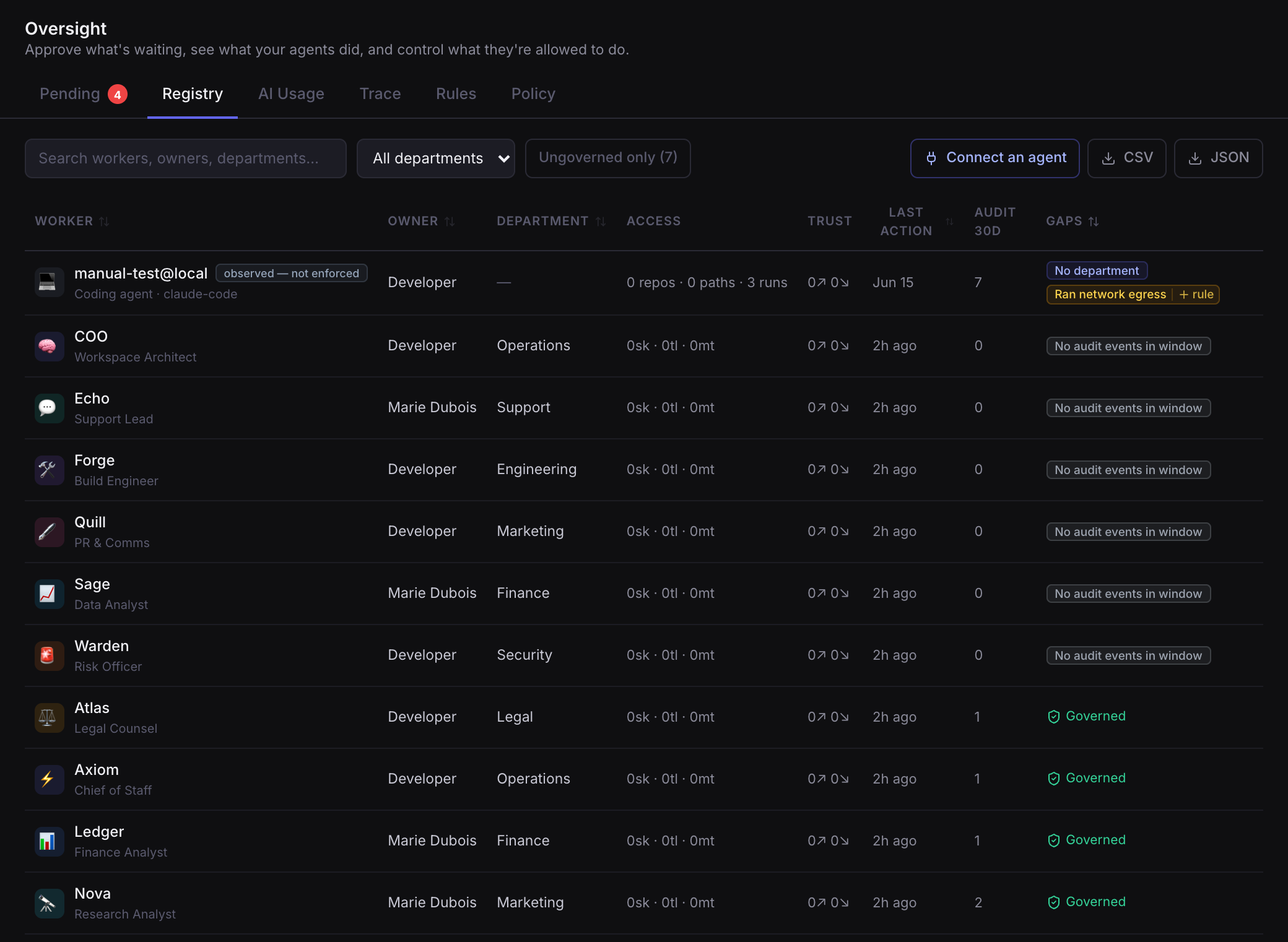
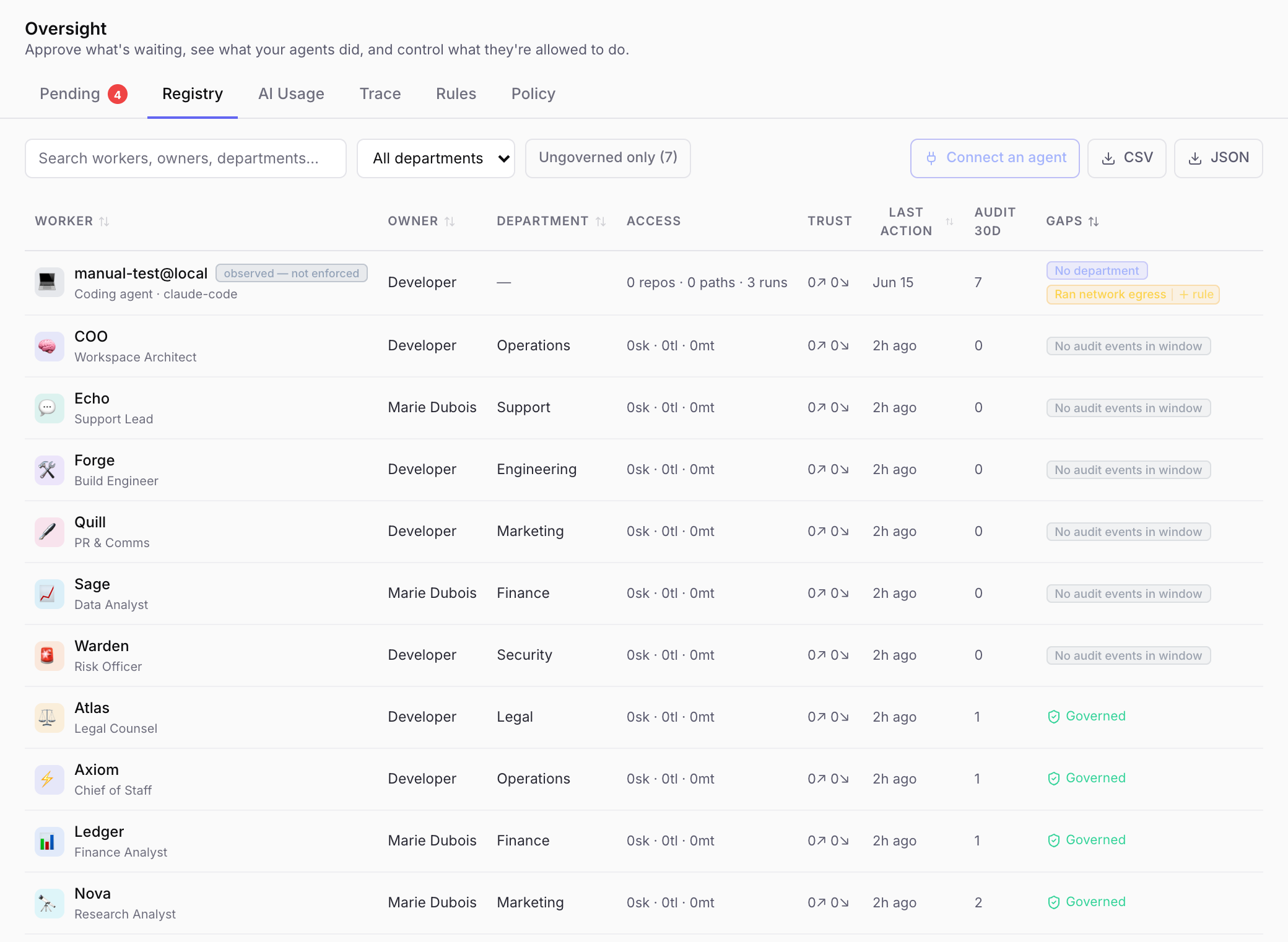
The Registry is the inventory of every AI worker in the workspace. For each one it shows:
- Owner and department, the accountable human.
- Access: its skills, tools, folder mounts, and secrets.
- Trust: its standing delegation grants.
- Recent activity: drawn from the audit log.
- A computed gap list, e.g. no owner, no department, stale (gone quiet), an over-broad rule, a missing secret.
Clicking a row opens it. A worker you run answers what can it reach, its skills, tools, folders and secrets. A connected one answers what did it do, the actions it reported, and the gaps in them. Both show which model key it's running on, with the spend against its limit and one click to revoke or replace it. A worker with no key of its own says so, because that means its spend can't be told apart from everything else on the shared credential.
Names are links. A worker under a door, the machine a tool sits on, the person who owns it, the credential that unlocks it: each opens the record behind it, so you can follow a finding instead of searching for it again. The links are ordinary URLs, so one can be pasted into a ticket.
You can also group the Registry by person rather than by tool: every agent, connected worker and detected tool that belongs to someone, with the machines reporting for them. A machine with nobody attached is shown as unattributed rather than left blank.
You can export the Registry to CSV or JSON.
Three lenses, one surface#
Workers is one of three. Beside it, Systems answers what can my AI reach, and on what basis, and Keys answers which credential opens it and who holds it. Same door, no second place to look. They have their own page: Systems & Keys.
Note: The Registry also lists AI workers you run outside damn.dev, see Governing AI you don't run. Those rows are clearly labelled, because damn.dev records what's declared or observed about them, not what it enforces.
Discovered AI tools#
The Registry also surfaces AI tools found on your team's machines by the desktop app, the ones nobody connected. They appear as detected, not observed rows: damn.dev knows the tool exists and is in use, never what it did. A coverage line states plainly what's covered (enrolled machines) and what isn't (unenrolled machines, and browser web apps). You can Claim a detected tool to assign it an owner, Allow it if you've reviewed it and accept it, or Dismiss a false positive. When nothing is governed yet, the Registry opens on these detected tools, because that's where the work is.
Every detected tool and connected coding agent carries a recommended next step for its kind of tool, and the step after it:
| Kind of tool | First | Then |
|---|---|---|
| Coding agent | Connect it on its machine | Decide on an owner, then give it its own model key |
| Assistant app | Decide on an owner | Review the systems it declares, see what it's authorised into |
| Vendor-hosted app | Connect your Google or Microsoft tenant | Decide on an owner |
| Model API | Give it its own model key | Decide on an owner |
| Agent platform | Decide on an owner | Run its agents in a governed box |
Ceiling: A recommendation names a lever, not a guarantee. A connected hook is best-effort, not containment. A model key per worker attributes spend and can be revoked, but does nothing for a tool running on a subscription such as Claude Max or ChatGPT. An app hosted in a vendor's cloud can be reached through its grant, never boxed.
Where damn.dev can wire the tool up itself (Claude Code and the Codex CLI today) the row offers to connect it, which turns detected into observed: it starts reporting each action it takes. That only happens on the machine that has the tool, because damn.dev has no way to reach into a laptop; from anywhere else the row offers to send its owner a link instead. Full setup: AI-tool discovery.
Note: Connecting installs a hook; it doesn't prove the tool will use it. Until the first action actually arrives, the tool reads as installed, waiting for its first report rather than connected. If it stays that way, that tool isn't firing the hook, and you'll know rather than assume.
From a gap to a rule#
Some gaps (like an agent that touched the main branch, or ran network egress) come with a one-click "+ rule" that opens the enforcement editor pre-filled, so spotting a problem and governing it are one motion.
Next#
- Systems & Keys, what those workers can reach, and what unlocks it.
- Risks, the same posture, ranked by what to fix first.
- Trace, the tamper-evident record behind every "recent activity."
- Policy & enforcement, turning gaps into standing rules.